
Changelog
Every update we've shipped.
October 2026
- MediaFeature Drop
Videos now show who appears in them, with a timeline bar for each person so you can jump straight to their moments.
- GeneralFeature Drop
The Jam app has been rebuilt for iPhone and Android, with a new library, composer, approvals, analytics and uploads designed for your phone.
- Media
Start typing in the header search bar and Jam now suggests matching collections, people and forms before you press Enter.
- Analytics
LinkedIn Company Page audience breakdowns (industry, seniority, job function, company size, location and more) can now be added to your analytics dashboards.
- Inbox
You can now send button messages and card carousels as saved replies in Instagram and Messenger DMs, not just plain text.
- Media
Upload a font family as a zip file in the editor and Jam adds every font inside automatically.
- Collections
Sharing a gallery is now a quick popover: copy the link, set access (Anyone, Password or Only my team) and edit the custom URL without opening a separate modal.
- Inbox
LinkedIn Company Page comments now appear in your Jam inbox alongside Instagram and Facebook, with public replies, Done and dismiss.
- Socials
Calendar cards now show the custom thumbnail you chose for a video post, and files dropped onto a day attach straight to the new post.
- Settings
A new Usage page in Settings shows how much storage each workspace in your plan is using, so you can see at a glance where space is going.
- Publishing
When you mention someone or a company in a LinkedIn caption, their profile photo or company logo now appears in the mention search results.
- Settings
A new Download Media permission lets you give someone access to view and browse the library without being able to download original files.
- General
The Analytics tab in the Jam app has been rebuilt, with followers, reach, views and engagements, trend charts and your top posts.
- General
Create, preview and schedule posts from your phone, using media from your Jam library, your photo library or Files.
- General
Uploads from the Jam app now carry on when you switch apps or lock your phone, with progress on your Lock Screen.
- General
Get a notification on your phone when a post needs your approval, a post fails to publish, someone mentions you or a form receives a submission.
- General
Review posts waiting for you from the Jam app: approve everything or per platform, request changes with a note, or leave a comment.
- General
Photos and videos open in a rebuilt full-screen viewer: tap a video for controls, pause, scrub, and swipe down to close.
- Media
Edits can now be renamed, from the row menu in the Edits list or by clicking the name in the editor's top bar.
- Media
New elements land inside the crop frame at the right size for each slide, and the left and right arrow keys move between slides.
- Analytics
A new Focus filter in the analytics bar lets you narrow every chart and the top-posts list to specific people, campaigns or tags, with an Any or All match.
- Socials
You can now connect your personal LinkedIn profile alongside your company pages, publish posts to it, and see its analytics in Jam.
- Analytics
Three new chart types are available when adding tiles to your dashboard: a weekday-by-hour engagement heatmap, a post-age cohort grid and horizontal bars.
- Analytics
Hovering any chart in your analytics dashboard now shows a styled popover with the data at that point, including a readable date, colour-coded series names and values.
- Publishing
You can now choose a cover image for LinkedIn video posts, for both Pages and personal profiles.
- Analytics
Download your current dashboard view as an Excel workbook with summary and detail sheets, all matching posts and comparison-period data.
- Settings
Owners and Admins can now send a password reset link directly to any team member from Settings, Users, using the row menu.
- Settings
Parent workspace members can create colour-coded tags and assign them to child workspaces, then filter the switcher and workspace settings by tag.
- Media
Start a design from scratch without a photo. Pick a size, a background colour or gradient, then add images, text and shapes as layers.
- Collections
Smart collections now stay up to date on their own: tag a file, approve a post or let media age and the collection updates within seconds.
- Media
Upload your own typefaces to Jam and use them in the editor across your whole workspace.
September 2026
- MediaFeature Drop
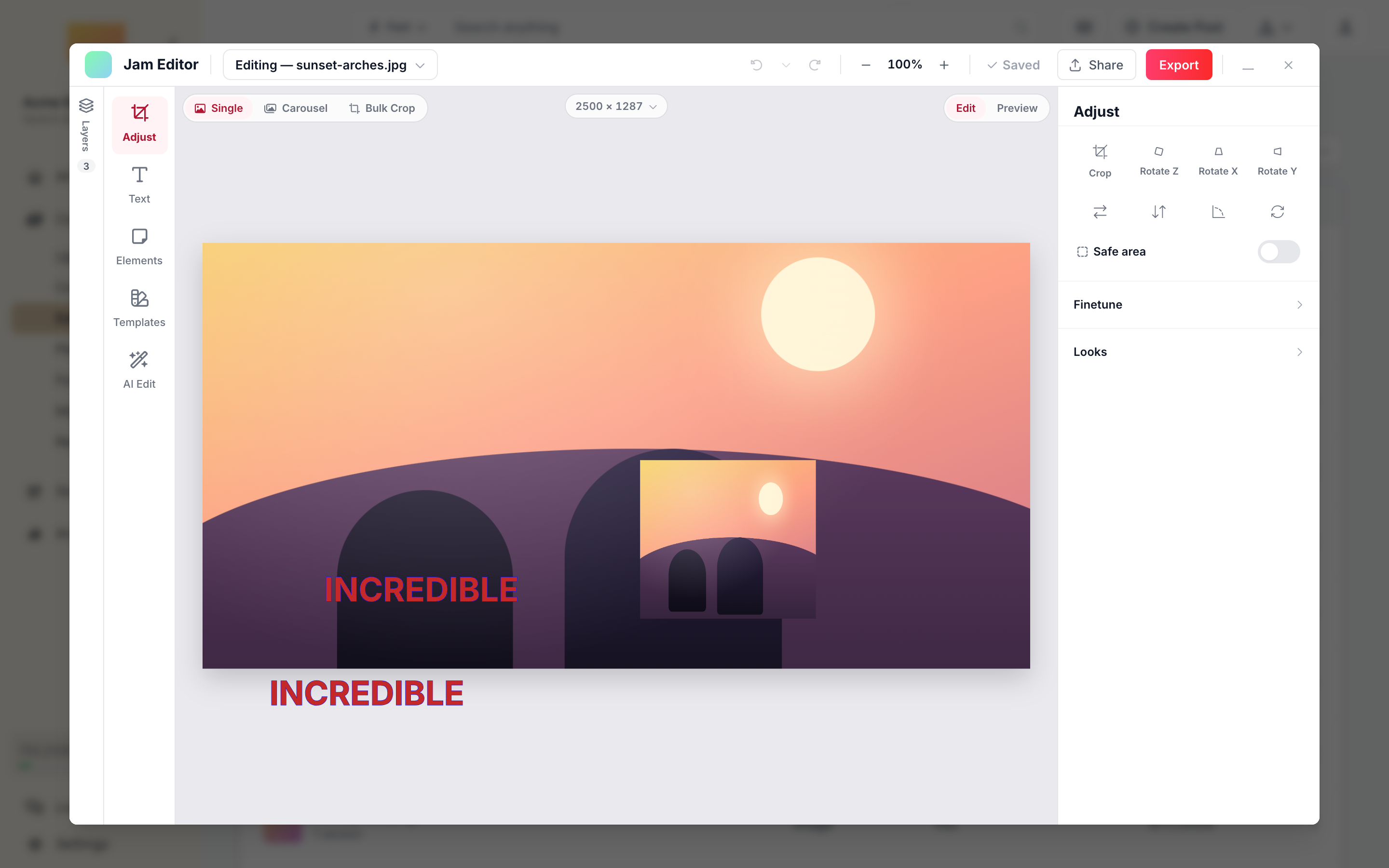
Edit photos in a full desktop editor inside Jam: crop, rotate, fine-tune, add text and elements, and apply AI-powered fills and background changes.
- Media
Select the background photo in the editor's Layers panel to crop, rotate, adjust exposure, apply Looks and set opacity, all without flattening your text and shape layers.
- Media
Share an editor template with other workspaces in your family as a live link. Child workspaces always see the latest version.
- Forms
Export any form to one or more child workspaces from the Forms row menu or builder settings.
- Media
Select images in the library or the editor and push them directly to your Shopify Files library, without attaching them to a product.
- Forms
Subscribe to the new form.media_processed event to receive a webhook after submitted media has been analysed by Jam AI.
- Media
The AI edit panel now lists available models with a short hint for each, such as Recommended, Best quality, Precise edits or Quick drafts.
- Media
Searching for 'brisbane 2024' now finds files named '2024-Australia-Brisbane-photo.jpeg', even though the words appear in a different order.
- Media
Shapes can now be rotated with the corner ring, just like images and text.
- Analytics
Build your own Analytics dashboards with resizable tiles, saved views and custom metrics, then share a read-only link with anyone.
- Media
Exposure, warmth and saturation now use correct colour maths, so the result you see in the editor matches the exported image exactly.
- Media
Drag the crop frame past the edge of a photo and a Fill bar appears. One click sends it to Gemini, which generates new scene to fill the space.
- Collections
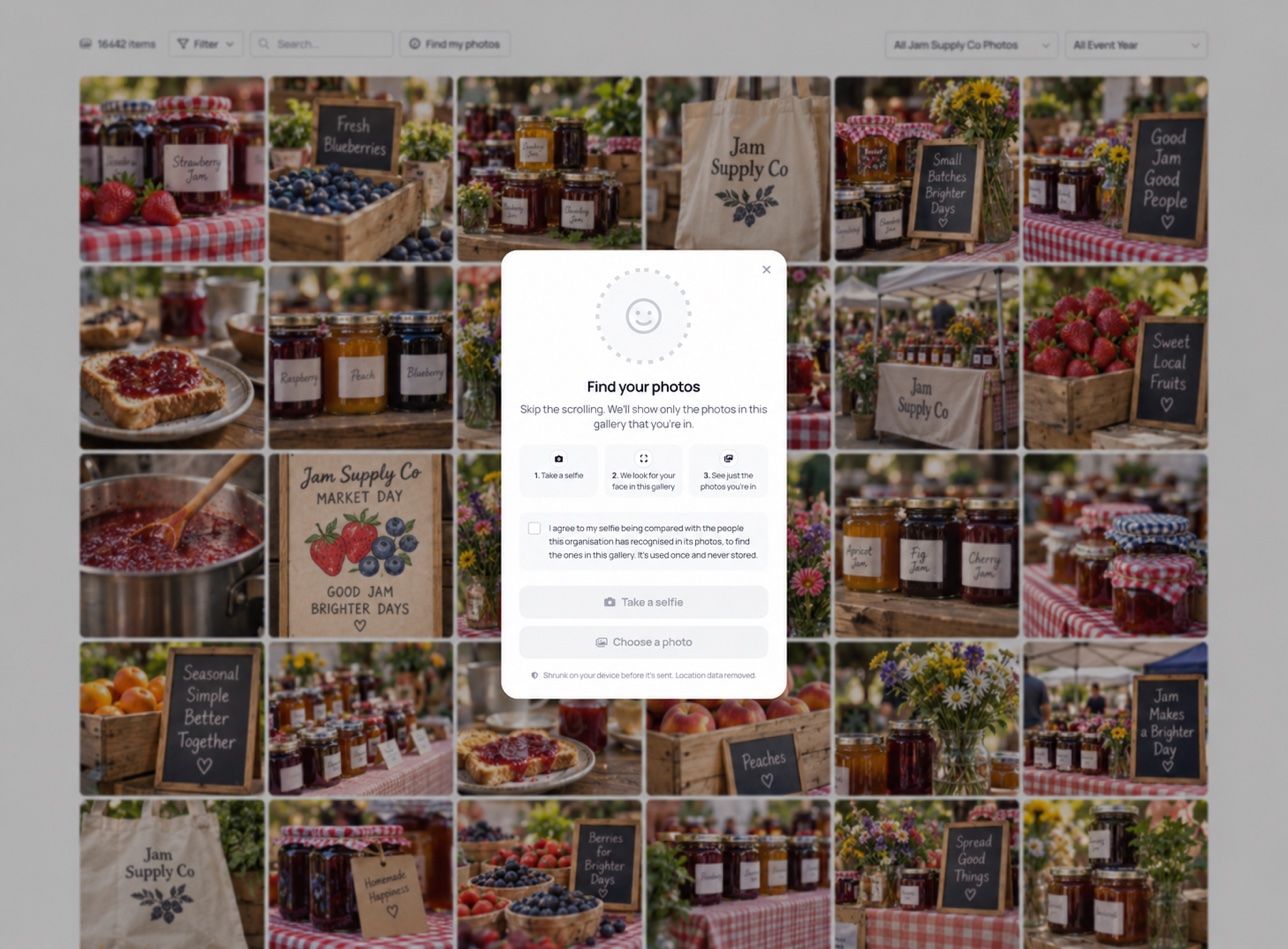
Visitors to a public gallery can tap Find my photos, take a selfie, and see only the photos that include them.
- Publishing
Instagram story posts now show an Auto-reply to story replies section in the composer's platform settings.
- Publishing
TikTok photo posts now always use the post caption as the description, so what you write is what gets published.
- Inbox
Automatically send a DM when someone comments on your Instagram or Facebook post, replies to a story, or messages you with a keyword.
- Analytics
A new Audience section in Analytics shows who follows you: age, gender and location across your Instagram and Facebook accounts.
- Integrations
Paste a Dropbox shared-folder link on the Migrations page and Jam imports everything inside it, with a collection created per folder.
- Forms
Contributors now see a live time estimate, upload speed and per-file status while they upload, then a clear receipt once everything is saved.
- Settings
Pending invites in the Users tab now have a Copy link button beside Resend and Revoke, so you can hand an invite over however you like.
- People
Share a link with anyone who uploaded to a form and they can name the faces Jam found, no login needed.
- General
Chat with the Jam team from the launcher in the bottom-left corner. The drawer opens over the page, and your draft and conversation history stay intact as you move around the app.
Enterprise only - Collections
Embed settings now live in Jam. Change them once and every existing embed on your website updates automatically, no re-embedding needed.
- Analytics
Filter analytics by post type (Posts, Reels, Carousels, Stories, Text) right next to the Accounts selector.
- Publishing
The thumbnail picker shows a mock Instagram profile grid, so you can see exactly how your Reel cover will sit among your posts before you publish.
- Approvals
Approval notification emails now deep-link straight to the exact approval in the right workspace and scroll it into view.
- General
Admins can copy an invite link directly from the pending invite row, useful when emails are not getting through.
- Collections
Share a collection with sibling workspaces in your organisation. They get live, read-only access with no copies.
- Integrations
Connect your Microsoft 365 tenant and import straight from SharePoint libraries and OneDrive.
- Approvals
External reviewers get a focused space with activity, comments, and the option to upload or edit before approving.
- Desktop
Manage your Jam library as a native folder in Finder. Uploads, renames and collection moves sync automatically.
- Publishing
Jam checks whether an account can be tagged as a collaborator before you schedule, not at publish time.
- General
Person pages have a Social posts tab showing every published post that person appears in.
August 2026
- Publishing
Create Pinterest carousels with 2 to 5 images, in the order you choose.
- Inbox
Hover any reply to see when it was sent and which teammate sent it, across DMs, Mentions and Comments.
- Media
Set an asset to expire now, in 30 days, 6 months or a year with one click.
- Analytics
Choose which report sections to include and pick an accent colour that runs through the whole PDF.
- Settings
View and update your company website from General Settings or the Intelligence tab.
- Media
Set a workspace-wide expiry in Settings and every new upload gets a hide date automatically.
- Media
Transcripts now come straight from the video's caption track, so words and timings match.
- Media
When Fast Search finds nothing, a small tip points you to Meaning Search. It appears a few times, then retires.
- Publishing
New short links are jam.link addresses. Existing links keep working.
- Approvals
Withdraw an approval request you sent, and it disappears from reviewers' queues.
- Link in Bio
Choose 'From Linktree' or 'From Later' in the Import menu to bring your existing page across in one step.
- Media
See who deleted each file, when, and exactly when it expires.
- Inbox
Create your own labels to organise DMs.
- Media
Close the tab mid-edit and your draft is waiting when you come back, ready to save or discard.
- Publishing
Captions generate only when you click 'Generate AI Caption'.
- Forms
Add your own logo to the centre of a form QR code, embedded in both SVG and PNG downloads.
- Socials
Collaboration posts you're tagged in by other Business accounts appear in your Calendar, labelled with the original author.
- Socials
Add notes to your Instagram Grid Planner to mark campaign moments, reserve slots or leave reminders.
- Socials
Filter your calendar by account and post status.
- Publishing
Instagram handles in captions and tags are verified before scheduling, so a typo can't fail a publish.
- Link in Bio
A new Analytics tab shows daily page views and link clicks over 7 or 30 days, with a per-link breakdown.
- Publishing
Posts no longer show as failed while the publisher is still retrying.
July 2026
- Inbox
Save reply templates and insert them with a slash command or the bolt button. Name variables fill in automatically.
- Media
Different resolutions of the same image now show as individual tiles, so you can use any of them directly.
- Socials
Each account card shows who connected it, with a Reconnect button when reauthorisation is needed.
- Publishing
Suggestions are calculated in your company's local timezone, and the box says whether the time comes from your real engagement history.
- Analytics
7-day and 28-day reach now matches Meta Business Suite.
- Inbox
Hover any image in a DM thread and tap 'Add to library'. Use 'Import media' in the header to bring in everything at once.
- Media
Upload a high-res and low-res export of the same photo and Jam groups them instead of hiding one as a duplicate.
- People
'Unname' a person from their profile menu. Their photos stay grouped, ready to be named again from the 'To review' tab.
- Socials
Reconnecting a Meta or Pinterest account now checks the reconnecting user actually has access, so a working connection can't be overwritten by mistake.
- General
A nudge card and nav dots point you to new features as they land. Opening 'What's New' marks everything read across your devices.
- People
Face thumbnails crop correctly on rotated photos, and tiles distinguish library photos from social post appearances.
- Settings
Connect your own subdomain, like brand.company.com, to serve Forms, Share Collections, Share Calendar, Share Analytics and short links.
- Media
Filter by your own tags right inside the Filter dropdown, alongside Collections and People.
- People
Select photos on a person's page and tap 'Not [name]' to remove them all at once.
- Media
iPhone and iPad users see a short guide to skip iOS's silent video compression, so 4K clips upload at full quality.
- Publishing
Personal Instagram accounts can use the location picker when your workspace has a Meta connection.
June 2026
- People
Every face Jam finds is gathered into named people and suggested groups. Name someone once and their whole gallery is labelled.
- Inbox
DMs, mentions and comments from Facebook, Instagram and Messenger in one inbox, with an Unread, Open and Done flow.
- Socials
Group posts into campaigns and track how they perform together.
- Publishing
Jam builds a deeper profile of your brand's voice, so captions match your tone. A new Micro length suits short-form posts.
- Approvals
Approve or reject each platform on its own, or hit Approve All. The history timeline shows every submission, comment and change.
- Socials
Send a link and someone outside Jam can connect their social accounts to your group, no login needed. Reconnect links show exactly which account is being refreshed.
- Socials
Your Instagram feed appears as a visual grid inside Jam, and bio link performance lives in one place.
- General
An Engagement pace card shows how a post is tracking against your similar posts.
May 2026
- Media
Faster uploads and downloads across Europe, Asia and the Americas.
- Collections
Recently accessed collections sit at the top of the media grid, and each collection shows its first four items as a thumbnail.
- Socials
A new home for social settings: connect and reconnect accounts and manage snippets.
- Publishing
Instagram multi-story posting, audio on Reels, Trial Reels settings and better location search.
- Approvals
A cleaner approvals interface, external reviewers who can edit posts, and version history you can jump between.
- Socials
Add media and drag posts around to curate your grid, toggle drafts and scheduled posts, and undo with Cmd/Ctrl+Z.
- Analytics
Analytics load 75% faster, with richer data across all platforms, LinkedIn account and post analytics, and previous-period comparisons.
February 2026
- Publishing
In Beta - Create and design Instagram Carousels from your images using our custom Jam Carousel Builder to make this process in a matter of clicks. There many features to…
- Forms
Now when a submission is made from the same person with the collection to be created, it adds it to the existing collection.
- Media
When opening an image popup click the Edit button in the bottom toolbar and add any shapes or text and save a version of the image.
January 2026
- General
See a live update on the status of all operations for the Jam Content app at jamcontent.com/status
- Billing
- Link in Bio
You can now setup a link in bio page for each of your Social Group. To add a new bio page, go to Accounts > Add Social Group. This will now appear as toggle.
- Link in Bio
You can now add various new blocks including direct integration to Jam Forms and Collections, Shopify products and a live feed from instagram links using the Jam Post…
November 2025
- Media
Shopify (Add image to Shopify product)
- Collections
Embed a collection in any website. This will only embed the media grid component and the filters. Simply copy the embed code and add it to any website.
- Collections
Share a collection by adding as many recipients as needed in the "Share Collection" popup. This will send an email with an invite from you to view the collection and…
- Socials
Drag and drop posts to reschedule.
October 2025
- Integrations
Unsplash is now integrated into Jam. Simply use the Upload from Unsplash icon in the top right and import any royalty free image into Jam.
- Publishing
Duplicate any post from your calendar now by opening the existing post and using the Duplicate button. This will retain the media and associated caption as well as a…
- Publishing
By default Jam provides you with 3 default scheduling times for ease of publishing content at key times.
- Publishing
When you use the one click AI Auto Caption when creating a new post it now provides follow up prompts to Refine Your Caption. Simply Generate Again or use of one of the…
- Settings
You can brand your Jam Dashboard with your own colour palette and Logo. Choose from 10 custom theme colours.
- Media
When you drag and drop a single Zip or Folder or multiple Zip and Folders it automatically detects your folder structure and on upload of media it will automatically…
- General
We have officially rebranded from Jjam to Jam Content with plenty of updates to go along with it.
September 2025
- Media
Load times have decreased by 95% when clicking/scrolling through your media library. This allows you and the team to see your media quicker
- General
Users can now see all the awesome and useful things we are working on as they are published. You will see this in the "What's New" sidebar in the top right and will show…
July 2025
- Socials
We have now integrated with Pinterest and all accounts now have the ability to connect their Pinterest Business Account. Cross share to Pinterest, add a link and add to…
- Collections
Quickly star your favourite collections and then use the Starred Only filter to navigate in a second to those collections simplifying your workflow.
- Publishing
Users can now pick a thumbnail directly from their media library when posting a video to Tiktok and reels to Instagram and Facebook
June 2025
- Media
Crop any image when opening the individual media and save as a new image or downloaded cropped photo.
- Integrations
Taking your digital asset management and workflow to a new level. For ecommerce businesses with a Shopify store, connect a custom app to open up Product Search sync in…
- Forms
Launching Form Templates as part of the Jjam Custom Forms. This allows you to get started with all the relevant fields based on the type of form you would like to create.
May 2025
- Collections
Create custom shared collections with optional password protection, designed to match the look and feel of your brand. Key features include:
- Collections
Collections can now be managed like a folder tree with unlimited sub collections. Drag and drop any collection into another one or move them back to be a parent…
- Forms
Export any form submissions with selected fields, all fields and filtered based on key media parameters.
- Media
Automatic detection when duplicate media has been uploaded.
- Publishing
The Post Creator now opens as a pop up and includes a few key new features:
April 2025
- Collections
Automatically set rules for your collections with various conditions. This will automatically update the collection on new media upload.
- Link in Bio
Create a beautiful, customisable landing page that connects your audience to all your content with just one link. This includes: