
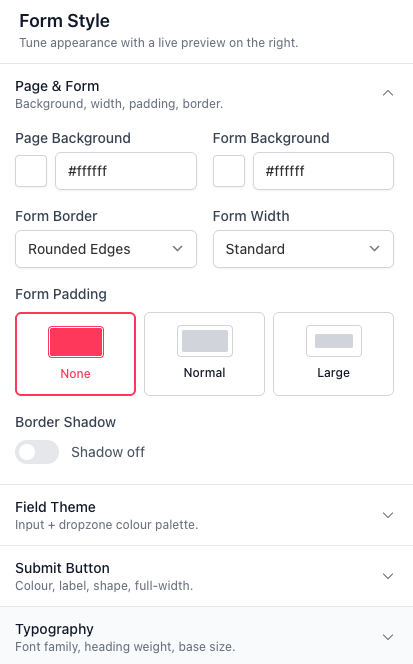
Open Form Style to make your form feel like yours. You tune the appearance on the left and see a live preview on the right as you go.
Note — Your logo isn't uploaded here. Add it with an Image block from the Blocks tab. See Create a form.
Page & Form
Page Background — the colour behind the form.
Form Background — the colour of the form itself.
Form Border — the border style, such as Rounded Edges.
Form Width — how wide the form sits, such as Wide.
Form Padding — None, Normal or Large spacing inside the form.
Border Shadow — turn a drop shadow on or off.
Field Theme
Set the colour palette for your inputs and the upload dropzone so fields match your brand.
Submit Button
Customise the submit button's colour, label, shape and whether it's full-width.
Typography
Choose your font family, heading weight and base text size.
When the preview looks right, click Save Style.
Tip — Add your logo, banner image or intro copy as blocks, and set the post-submit message on the Confirmation tab.