
Share a branded, streamlined analytics dashboard with clients or stakeholders via a public link — no Jam account needed to view it. Click Share on the Social Analytics page.
Make it public
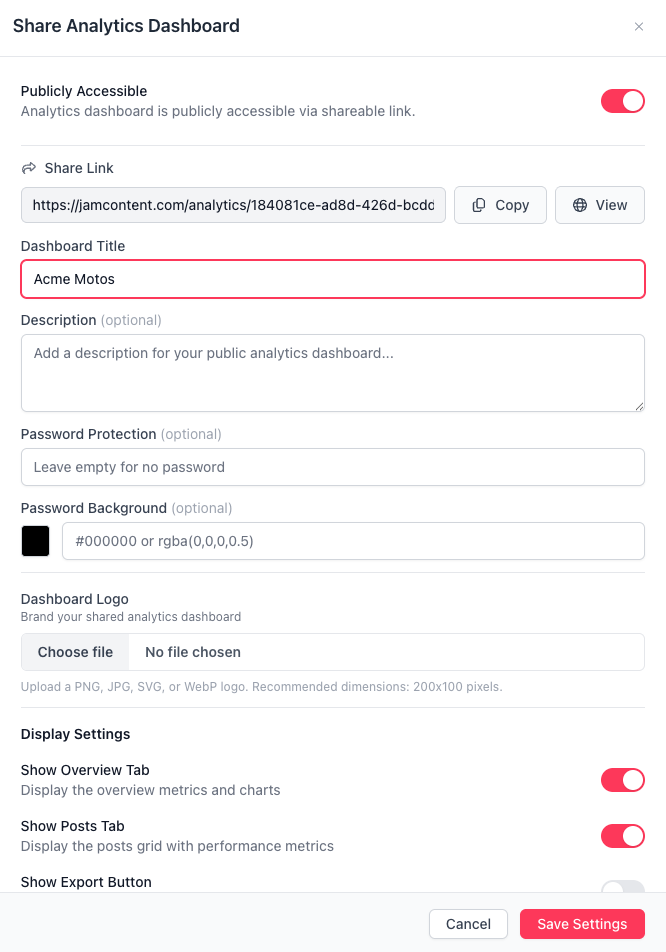
Turn on Publicly Accessible.
Copy the share link (or View it) and send it on.
Brand & protect it
Dashboard Title and Description — name the dashboard and add context.
Password Protection — add a password (leave empty for none), with a Password Background colour.
Dashboard Logo — upload your logo (PNG, JPG, SVG or WebP, 200×100px).
Display settings
Show Overview Tab — the metrics and charts.
Show Posts Tab — the posts grid with performance.
Show Export Button — let visitors export reports (PDF/Excel).
Click Save Settings when you're done.
Tip — Hide the Posts tab and Export button for a clean, headline-only view for clients.