
Webhooks send Jam events to your own systems, so you can automate what happens after a form is submitted or media is shared. Manage them in Settings > Webhooks.
Using n8n? Follow Connect webhooks with n8n for the node settings and verification expression.
How a connection works
- Create: add your endpoint URL and choose the events to receive.
- Verify: Jam sends a GET request with a random challenge. Your endpoint returns the same challenge as JSON.
- Receive: once verified and enabled, your endpoint receives signed POST requests for the selected events.
Active and verified are separate requirements. An enabled endpoint does not receive events until verification succeeds. Passing verification proves your GET handler works; your POST handler must also be configured.
Before you start
- Use a publicly reachable HTTPS endpoint with a valid certificate. Localhost and private network addresses are not suitable.
- The same URL must handle GET for verification and POST for event delivery.
- You need permission to manage webhooks in the correct Jam workspace. Ask a workspace administrator if these controls are unavailable.
- Keep the webhook signing secret in secure storage. You will need it to authenticate event requests.
1. Add your webhook
- Open Settings > Webhooks in the workspace whose events you want.
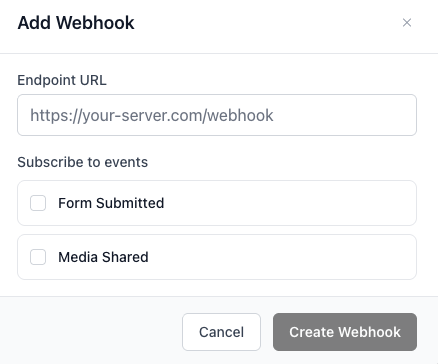
- Click Add Webhook and enter your endpoint's final HTTPS URL. Use a production URL, not a temporary test listener or a page that redirects elsewhere.
- Select Form Submitted, Media Shared, or both.
- Click Create Webhook. Copy the signing secret when it is displayed and store it securely.
- Open the endpoint details to complete verification.
Form Submitted uses the event name form.submitted. Media Shared uses media.share_media and is triggered when media is explicitly sent to a webhook, not simply because a file was uploaded.
2. Implement the verification response
When you click Verify Now, Jam sends a GET request like this:
GET https://your-server.example/jam?challenge=abc123
User-Agent: JAM-Webhooks/1.0
The challenge is a URL query parameter. It is not sent in a request header or request body. Read the incoming challenge parameter and return its exact value.
HTTP/1.1 200 OK
Content-Type: application/json

{"challenge":"abc123"}- Return HTTP 200 and a JSON object containing the matching
challengestring. - Respond within 10 seconds. Do not wait for another service or run your media-processing workflow first.
- Use the value from each incoming request. Jam generates a new challenge on each verification attempt.
- Do not return plain text, an array, HTML, a fixed example value or a nested object such as
{"data":{"challenge":"abc123"}}. - Do not require a login, Basic authentication or a custom authentication header for GET verification. Jam sends the challenge and its User-Agent, not those credentials.
To check your handler before verifying, replace the example URL below with your endpoint:
curl -i 'https://your-server.example/jam?challenge=jam-check-123'Expect HTTP 200 and {"challenge":"jam-check-123"}. This only tests your handler. You still need to click Verify Now in Jam to verify the saved endpoint.
3. Receive event deliveries
Jam sends events as HTTPS POST requests with a JSON body. Important headers are:
Content-Type: application/jsonX-JAM-Event: the event type, for examplemedia.share_media.X-JAM-Signature: the timestamp and HMAC signature used to authenticate the request.User-Agent: JAM-Webhooks/1.0
The JSON structure depends on the event. Media sharing includes a media array; form submission payloads include submission and form information. Inspect an actual event before mapping fields into your destination system.
Validate the signature, safely accept or queue the event, and return a 2xx response within 30 seconds. HTTP 200 with {"received":true} is a suitable acknowledgement. Run lengthy processing after safe acceptance, with your own error handling.
A successful delivery means your endpoint returned 2xx. It does not prove a CRM update, file download or later automation step completed. Monitor those steps in your receiving system.
Authenticate POST requests
Ownership verification and event authentication are different. Anyone who knows a public URL could attempt a POST, so validate X-JAM-Signature before acting on its contents.
X-JAM-Signature: t=TIMESTAMP,v1=HEX_DIGEST
signed_message = TIMESTAMP + "." + EXACT_RAW_REQUEST_BODY
expected_digest = HMAC_SHA256(signing_secret, signed_message)- Read the timestamp
tand signaturev1. Reject missing or malformed values. - Use the timestamp text, a full stop and the original request-body bytes to calculate HMAC-SHA256 with your secret.
- Compare the hexadecimal digest with
v1using a constant-time comparison. - Apply a reasonable timestamp tolerance, such as five minutes, with a correctly synchronised server clock to reduce replay risk. This is a recommended receiver policy.
- Only process authenticated events. Keep secrets out of URLs, shared screenshots and logs.
Preserve the raw body before parsing JSON. Parsing and re-serialising can change spaces or character escaping and cause valid signatures to fail.
Test the complete connection
- Confirm the endpoint is verified, enabled and subscribed to the event you are testing.
- For Form Submitted, submit a test form in the same workspace. For Media Shared, select suitable media and use Send to Webhook.
- Open the webhook details and review Delivery Analytics and Recent Deliveries.
- Check the receiver's request log and verify the intended downstream action completed.
Do not assume that an old event will be replayed automatically after an endpoint is verified or re-enabled. Trigger a fresh test event.
Retries, duplicates and disabled endpoints
Failed requests can be retried with a delay. A delivery marked retrying has not succeeded; failed means it is no longer proceeding through that delivery's retry path. Repeated failures can cause Jam to disable the endpoint.
Design the receiver to tolerate duplicate attempts. Deduplicate using stable event data and the action you are performing, for example a submission ID for a form-processing action. Do not assume a retry has identical signed bytes or a new business event.
Every active, verified subscription matching an event can receive a copy. Avoid leaving duplicate connections to the same destination enabled unless that is intentional.
Troubleshooting
- Verification HTTP 404: check the exact URL and that a GET route is registered and reachable.
- Verification HTTP 500: inspect the receiver's execution or server error log.
- Invalid JSON / Expecting value / Extra data: the response body is not a valid JSON object. Return JSON, not plain challenge text or HTML.
- Challenge mismatch: check spelling, nesting and that the value comes from the current request's query parameter.
- Verification timeout: return the challenge directly within 10 seconds.
- 401 or 403: check receiver authentication and access restrictions. For POST, confirm the secret and signature calculation.
- Verification works but delivery returns 404 or 405: add POST handling at the same URL. A working GET route is not enough.
- No delivery appears: confirm workspace, event selection, verified status and enabled status. For Media Shared, explicitly send media to the webhook.
- Delivery succeeded but nothing happened: inspect the receiver's downstream steps. Jam cannot detect failures after your endpoint has acknowledged the event.
Change or disconnect an endpoint
Edit the URL or subscribed events in the endpoint details. Saving a URL requires verification again. Keep the receiving workflow ready before making the change. Use the enable/disable toggle to pause future deliveries; deleting removes the connection. After correcting repeated failures, re-enable the endpoint if necessary and test with a fresh event.
For n8n-specific setup, continue to Connect webhooks with n8n.