
General settings cover your workspace's identity and look. Go to Settings → General.
Details
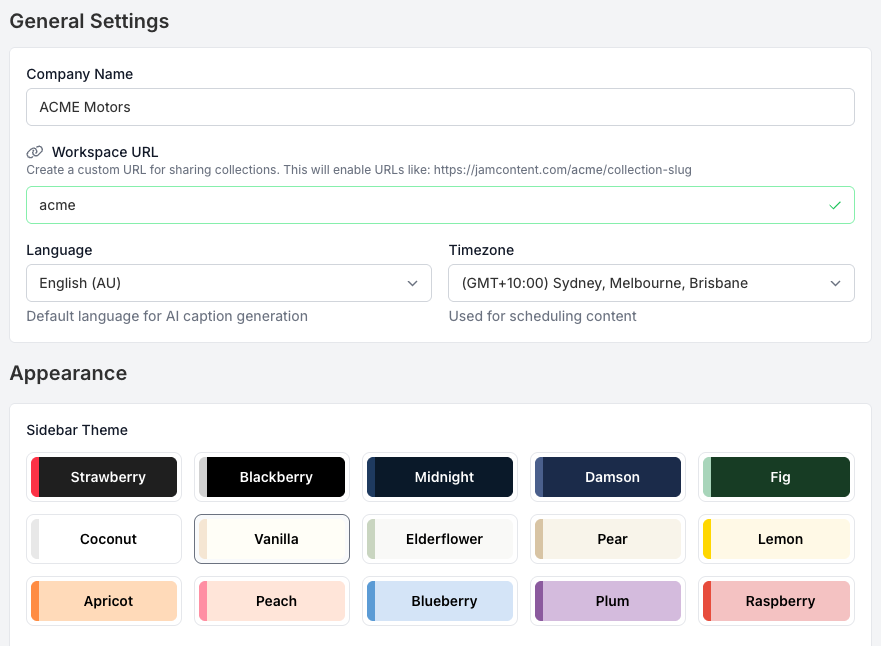
Company Name — your workspace name.
Workspace URL — a custom slug for sharing collections (e.g.
/dgr/collection-slug).Company Website - your website address (e.g.
yourcompany.com). Jam builds your Company Context from it, so keep it current. You can also update it from the Intelligence tab - see Intelligence settings.Language — the default language for AI caption generation.
Timezone — used for scheduling content; all scheduled times use it.
Appearance
Sidebar Theme — a colour theme for the app sidebar (Strawberry, Midnight, Fig, Vanilla and more).
Custom Logo — upload your logo (PNG, JPG, SVG or WebP, ~200×100px); the default Jam logo is used if none is set.
Click Save Changes when done.
Tip — Set your timezone before scheduling so posts go out exactly when you expect.