
Line up posts in advance and let Jam publish them automatically. In Publish Post you have three choices.
Post Now, Schedule or Next Best Time
Post Now — publish straight away.
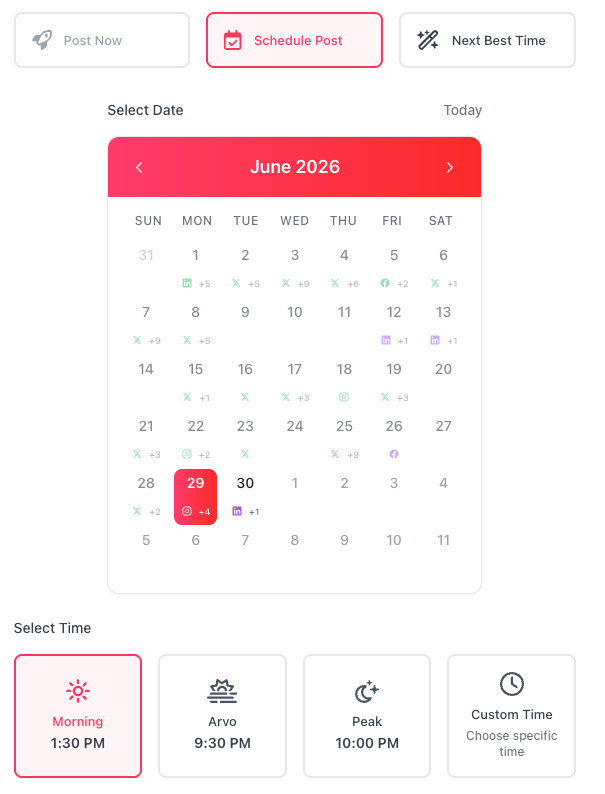
Schedule Post — pick a specific date and time (below).
Next Best Time — let Jam choose the best upcoming slot for your audience. The box shows the suggested time and where it came from: Based on your audience engagement history when Jam has enough of your real results to go on, or Recommended posting time when it's a general recommendation. Suggestions are worked out in your company's timezone, so the time you see is the time it publishes.
Pick a date
Choose Schedule Post.
Under Select Date, pick a day on the calendar (or use Today).
A small social icon under a date marks days that already have scheduled or published posts — handy for spreading your content out.
Pick a time
Choose a quick preset or set your own:
Morning, Arvo and Peak — one-tap preset times. You can rename these presets and set their times in Settings, so they're whatever suits you.
Custom Time — choose a specific time.
Times use the Timezone set in General settings.
Tip — Scheduled posts appear on your calendar, where you can drag them to a new slot any time.