
Stuck for words? AI Auto Caption writes a caption from your media and your brand's voice — then you can refine it in a click. Nothing is generated until you ask for it.
Generate a caption
In the composer, add your media (the button reads Add media to generate a caption until you do).
Click Generate AI Caption in the caption toolbar.
Review the suggestion and edit it however you like.
Captions only generate when you click the button - opening the composer or changing media never overwrites what you've written. With several accounts selected, the caption draws on the voice and post history of the brand you're posting for.
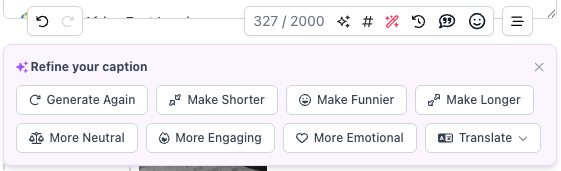
Refine your caption
Open Refine your caption to reshape what you've got with one tap:
Generate Again — a fresh take.
Make Shorter / Make Longer — adjust the length.
Make Funnier, More Neutral, More Engaging or More Emotional — shift the tone.
Translate — translate the caption into another language.
Set the length and voice
Each social group can set its own Caption Length in group settings — from Micro (3-6 words, made for short-form posts) through Brief, Short, Medium and Long. The company-wide default lives in Intelligence settings.
Each group also builds a Voice Profile — brand voice directives generated automatically from the group's recent posts, so captions match your tone and the way you naturally write.
Edited the Voice Profile by hand? It's pinned — automatic regeneration won't overwrite your changes.
Tip — Set your tone, context and brand voice once so every caption sounds like you. See Intelligence settings and your group's Voice Profile.